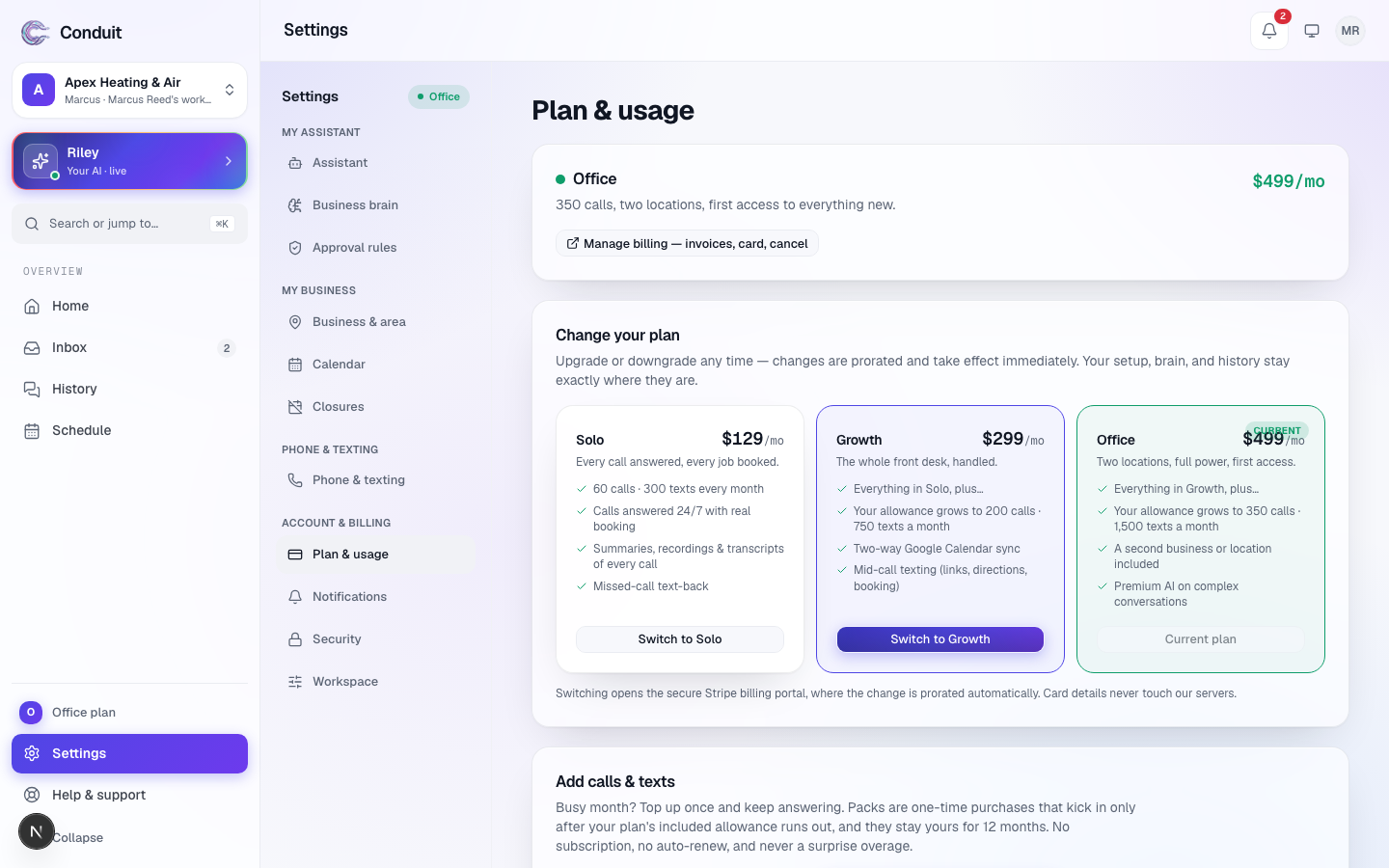
Everything about what you pay lives on one screen: Settings → Plan & usage. At the top, your plan and its allowance beside the date it resets, with Compare plans and Manage billing; below, the plans side by side, packs, This month's usage, and cancelling, in plain words.
The three plans
| Plan | Solo | Team | Office |
|---|---|---|---|
| Monthly | $79 | $149 | $299 |
| Annual (pay for 10 months) | $790 | $1,490 | $2,990 |
| Minutes a month | 150 | 350 | 600 |
| Texts a month | 300 | 750 | 1,500 |
| Locations | 1 | 1 | 2 |
Every plan gets the whole assistant — answering, Google Calendar booking, texting once registered, emergency escalation, spam screening, night school, the morning briefing, all 20 voices. Plans differ only by minutes, texts, locations, and priority support on Office.
Carrier registration is included in your plan — there's no separate setup fee. The carriers' one-time registration and vetting fees for business texting, and their monthly campaign fee while texting is on, are paid by Conduit out of your plan price and never billed to you separately. Your callers' own message and data rates are between them and their phone carrier.
What counts as a minute
Connected talk time between a real person and your assistant, measured to the second. Robocalls, spam, hang-ups under ten seconds, and calls taken in message-only mode are refunded to your pool when the call settles. Your own test calls count like any other call.
You set the longest single call — 3 to 10 minutes, 5 unless you change it — in Settings → Assistant. Thirty seconds before the limit your assistant tells the caller and wraps up, so one call can never eat your month.
At the cap
When the month's minutes are used, your assistant switches to taking messages. Every caller still leaves a complete message that lands in your inbox. Nothing bills. You choose: add a pack, or wait for the month to reset.
Packs
100 extra minutes — $29 · 250 extra minutes — $59 · 250 extra texts — $10. One-time, bought on this screen with Add to my line, used only after your plan's allowance, never auto-renewed, yours for 12 months. Packs aren't covered by the guarantee.
The guarantee
If Conduit isn't right for you, cancel within 30 days of going live and your first payment is refunded in full. The guarantee covers your first subscription payment; minute and text packs aren't refundable. To use it, cancel from Settings → Plan & usage or email support@conduitapp.ai within 30 days of going live — "going live" is the day your first plan payment is taken — and the refund is issued within five business days, no questions asked. After that window, cancelling stops your plan at the end of the paid period and later periods aren't refunded. Billing mistakes and double charges are always refunded in full.
Changing plans
Switch plans under Your plan on Settings → Plan & usage, where your current plan is marked Current plan: Switch to the plan you want and the change takes effect immediately, prorated. If the page says switching isn't self-serve on your account yet, email support@conduitapp.ai and we'll move you over. Your assistant keeps answering the whole time; nothing you've set up is lost.
If a payment fails
If your card is declined at renewal, your assistant keeps answering exactly as usual for 14 days while your bank retries the card. We tell you three times — the day the payment fails, a reminder halfway through, and a final notice two days before the end — in your inbox and by email, each with the exact dates.
Update your card under Manage billing and everything carries on as it is, same number included. If the payment still hasn't gone through after 14 days, your plan ends the way a cancelled one does: your assistant pauses and its Conduit number is released. If you forward your own number to your assistant, turn the forwarding off at your carrier before then — every carrier's off code is in forwarding your existing number. Your setup and your data stay, and paying again reactivates the same assistant on a fresh number.
Managing your payment
Manage billing opens the Stripe portal to update your card, download invoices, or cancel — or press Cancel plan at the bottom of Plan & usage. Cancelling is self-serve: your plan runs to the end of the period you paid for, then your assistant stops answering and its number is released. Your setup and your data stay until you delete the account — see cancelling and taking your data with you.
Common questions
Does it cost anything to set up?
No. Creating your account and building your assistant is free. You start paying when you pick a plan and take it live. Carrier registration for business texting is included in your plan — there's no separate setup fee.
What happens if I use up my minutes for the month?
Nothing bills. Your assistant switches to taking messages, and you can add a one-time pack of minutes that's used only after your plan's allowance — no subscription, no auto-renew.
How does the guarantee work?
If Conduit isn't right for you, cancel within 30 days of going live and your first payment is refunded in full. The guarantee covers your first subscription payment; minute and text packs aren't refundable. To use it, cancel from Settings → Plan & usage or email support@conduitapp.ai within that window; the refund is issued within five business days, no questions asked.
Can I switch plans?
Yes. On Settings → Plan & usage, Switch to (the plan you want) changes it straight away, prorated. If that page says switching isn't self-serve on your account yet, email support@conduitapp.ai and we'll move you over — your setup and history stay exactly as they are.
What happens if my card is declined?
Nothing changes right away. Your assistant keeps answering exactly as usual for 14 days while your bank retries the card, and we tell you three times — the day it fails, a reminder halfway through, and a final notice two days before the end — each with the exact dates. Update your card under Manage billing and everything carries on, same number included. If it's still unpaid after 14 days, your assistant pauses and its Conduit number is released.
Is my card safe?
Yes. Payments run through Stripe's checkout and billing portal — card details never touch Conduit's servers.
Stuck? Write to a person.
Email support@conduitapp.ai — a real person reads every message. No ticket bots, no phone tree.