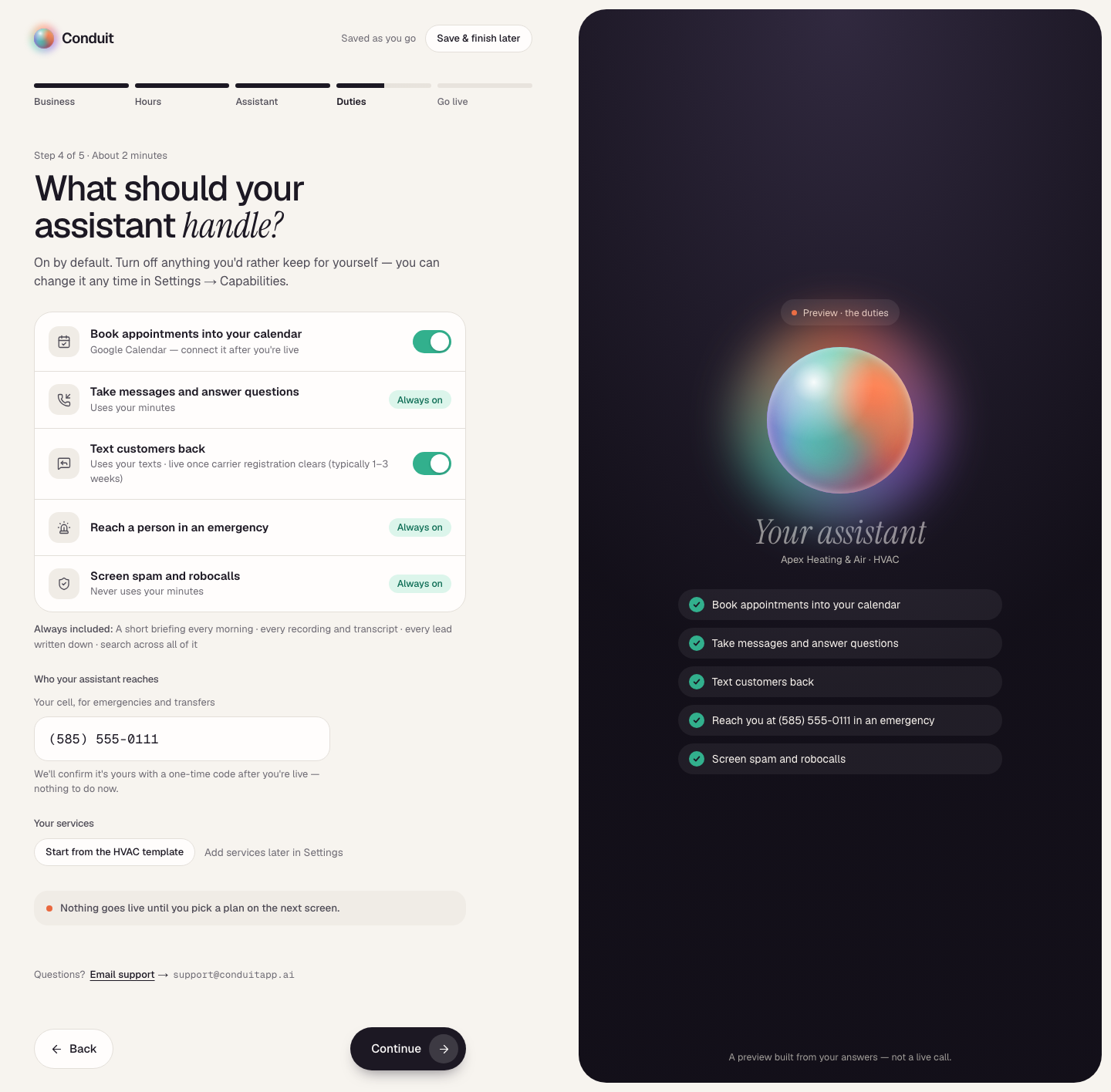
Your assistant is only as good as what it knows. This is where you teach it your business so it answers like someone who actually works there. It's screen 4 of setup — Duties, "What should your assistant handle?" — where its duties are switched on, your cell goes in, and your services get their start.
What it handles
The duties are on by default, each a row with what it uses: Book appointments into your calendar, Take messages and answer questions, Text customers back (live once carrier registration clears), Reach a person in an emergency, and Screen spam and robocalls. Booking and texting have a switch — turn either off if you'd rather keep it for yourself; the other three say Always on. You can change any of it later in Settings → Capabilities.
Under the list, Always included names what comes with every duty set — the morning briefing, every recording and transcript, every lead written down, and search across all of it. Then, under Who your assistant reaches, Your cell, for emergencies and transfers is where emergencies and transfers go; you'll confirm it with a one-time code after you're live — nothing to do now.
Review the scan
If you gave a website or Google listing on screen 1, the last section of this screen reads What we found on your site: the services, common questions, and policies your assistant drafted from it, each ticked. Untick anything that's wrong and press Use the ticked items — or Not now to leave it. Nothing goes live until you pick a plan on the next screen.
No website? The section is Your services: Start from the [your type] template adds a starter list for your business type in one press, or add them later in Settings.
Your services
In Settings → Business brain, on the Services tab, each service has a name, an optional description (it helps your assistant answer questions and match the caller to the right service), and an Emergency service? switch for anything that can be an urgent same-day call. There is no price field: your assistant never quotes a price on the phone, so it never needs one. Add a service adds one more; Save services keeps your changes.
The questions customers ask most
"Do you take emergency calls?", "What area do you cover?", "Do I need to be there?" — the more of these you add, the fewer messages it has to take. Each answer is a sentence or two in your own words, on the Questions & answers tab in Settings → Business brain.
Changing it later
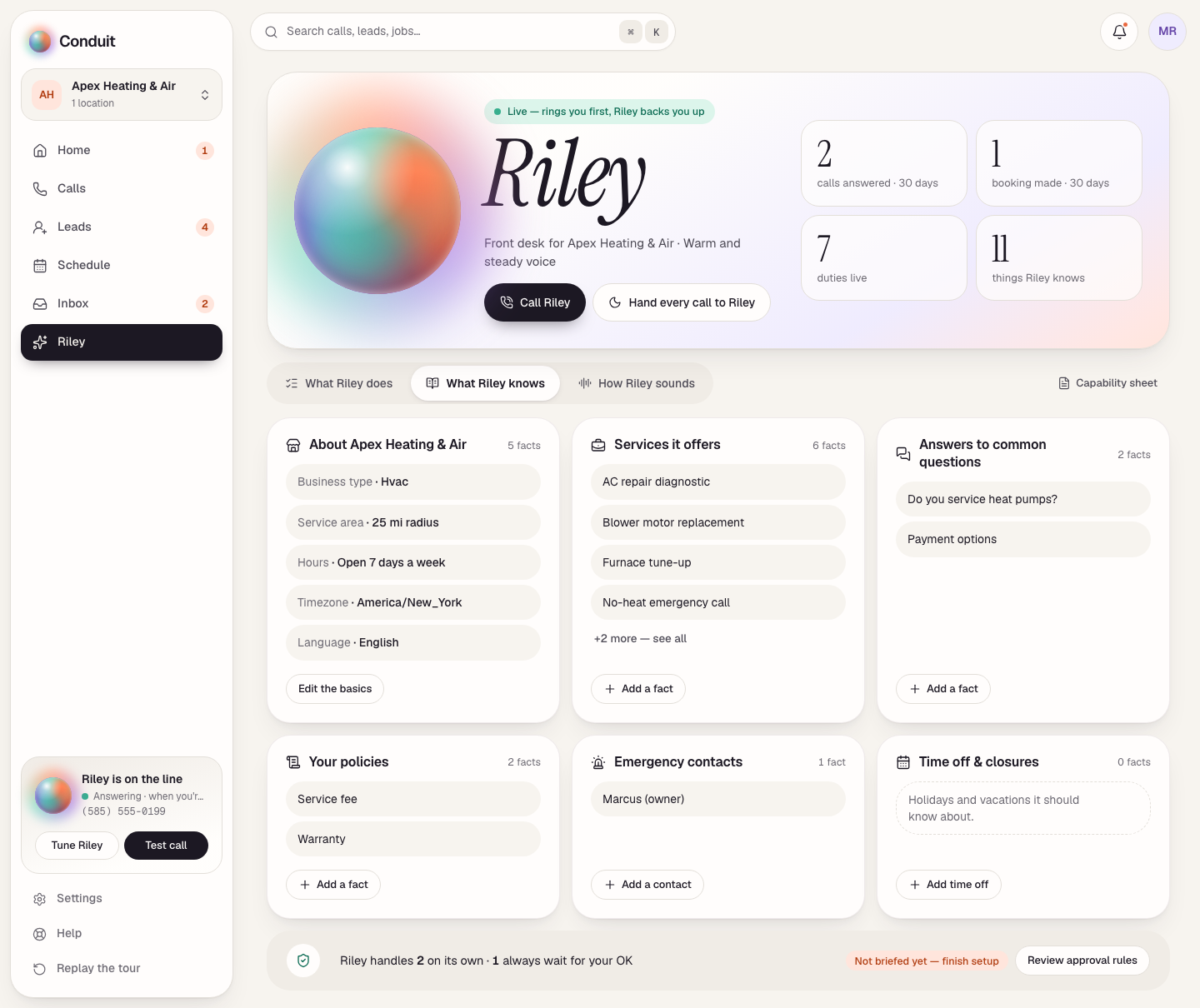
After setup, everything your assistant knows lives in Settings → Business brain — and on your assistant's page, on the What it knows tab (it carries the name): the basics, your services, answers to common questions, your policies, emergency contacts, and time off, each in its own card with a way to add one more. Edit any of it whenever you like; your live assistant has the change within a few minutes.
What's next
With that in place, you'll meet your assistant and pick a plan — step 3.
Common questions
Will it make up a price if it doesn't know one?
No. Your assistant never states a price on the phone — not an estimate, not a range. It books the visit or takes a message, and you handle the money conversation.
Can I change this later?
Yes. Everything your assistant knows lives in Settings → Business brain (and on your assistant's page, on the What it knows tab). Save an edit and your live assistant has it within a few minutes. Setup is a head start, not a lock.
Related
- Create your account and set up your businessStep 1 of 6: sign up free and tell Conduit about your business. Five setup screens, calls live the same day — you pay only when you go live.
- Getting around ConduitA quick map of Conduit: Home, Calls, Leads, Schedule, Inbox and your assistant down the left; search, the bell and your account across the top.
- Meet your assistant and pick a planStep 3 of 6: choose a name, voice, and personality, then pick Solo, Team, or Office and go live. You see the price before you pay.
Stuck? Write to a person.
Email support@conduitapp.ai — a real person reads every message. No ticket bots, no phone tree.