Your assistant does a lot while you're working. The Inbox is where it writes it all down for you — one short, plain-English note per thing it handled. Open it from Inbox in the menu or the bell at the top right of the screen (a coral dot on the bell means something unread); most mornings it's a two-minute read.
A letter for everything it did
Each item reads like a short letter: a call it handled, a voicemail it took, or your morning briefing. Click one to read the full write-up.
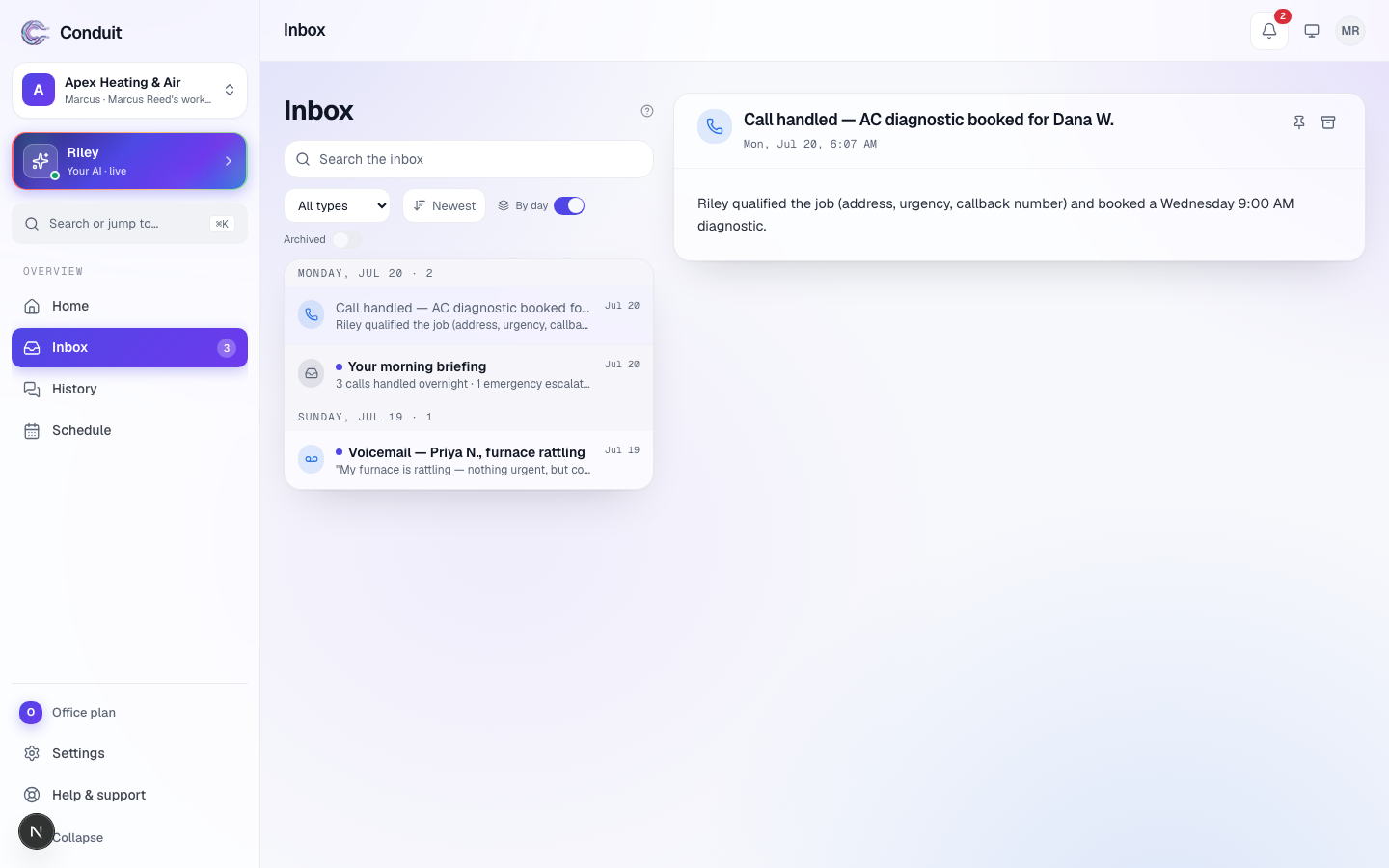
- The list ① is everything your assistant wrote down, newest first and grouped by day — calls handled, voicemails, and briefings. A coral dot marks one you haven't read.
- The reader ② opens when you click an item. It's the full write-up, signed by your assistant, with links straight to the call recording, the lead, or the booking behind it.
- Inbox · Pinned · Archived ③ switches between what's current, what you've kept, and what you've cleared, each with its count.
- Sort and filter ④, the sliders button, flips the order (Newest first or Oldest first), turns Group by day on or off, and narrows the list to one kind of item under Filter by type (All types brings everything back).
Keep the important ones, clear the rest
- Pin anything you want to keep handy with the pin button at the top of the reader — it stays at the top of the list, and under Pinned.
- Archive items you're done with, with the button beside it. They're never deleted; Undo on the confirmation brings one straight back, and Archived shows them all.
- Search the inbox, the box at the top, finds any past item by name or words in it.
When callers keep asking something your assistant couldn't answer, the item comes with a Teach box (it carries your assistant's name): type the answer in a sentence and it uses it from the next call on — see questions it couldn't answer.
The Inbox is a record, not a to-do list. Anything that actually needs a yes or no from you shows under Needs you on Home instead — see getting around Conduit.
What's next
Want the raw call itself — the recording and word-for-word transcript? That lives in Calls.
Common questions
Is the Inbox the same as my email?
No. It's inside Conduit. Your assistant writes here first; depending on your notification settings, a copy can also reach your email, your phone by text, or a push notification — but the Inbox is always the complete, permanent record.
What's the difference between the Inbox and Needs you?
The Inbox is a read — a log of what happened. "Needs you" (on Home) is a to-do — things waiting on a decision from you. Most Inbox items need nothing from you.
Can I keep something so it doesn't scroll away?
Yes. Pin any item and it stays at the top, and under Pinned. You can also archive items you're done with — they move to Archived, where you can open them again any time.
Related
- Your assistant, at a glanceSee everything your assistant does from one page — its duties, what it knows, how it sounds, this month's allowance — and where to change any of it.
- Your calls and textsEvery call and text your assistant handled — each with its recording, full transcript, and outcome — plus how to filter to what matters.
- Around-the-clock call answeringYour assistant answers your business number — hand it out or forward your line to it — works out what callers need, books or messages, and logs every call.
Stuck? Write to a person.
Email support@conduitapp.ai — a real person reads every message. No ticket bots, no phone tree.