Settings → Phone & texting is where you control the phone side of your assistant: the number, who answers, and when.
Your number, calls, and texting
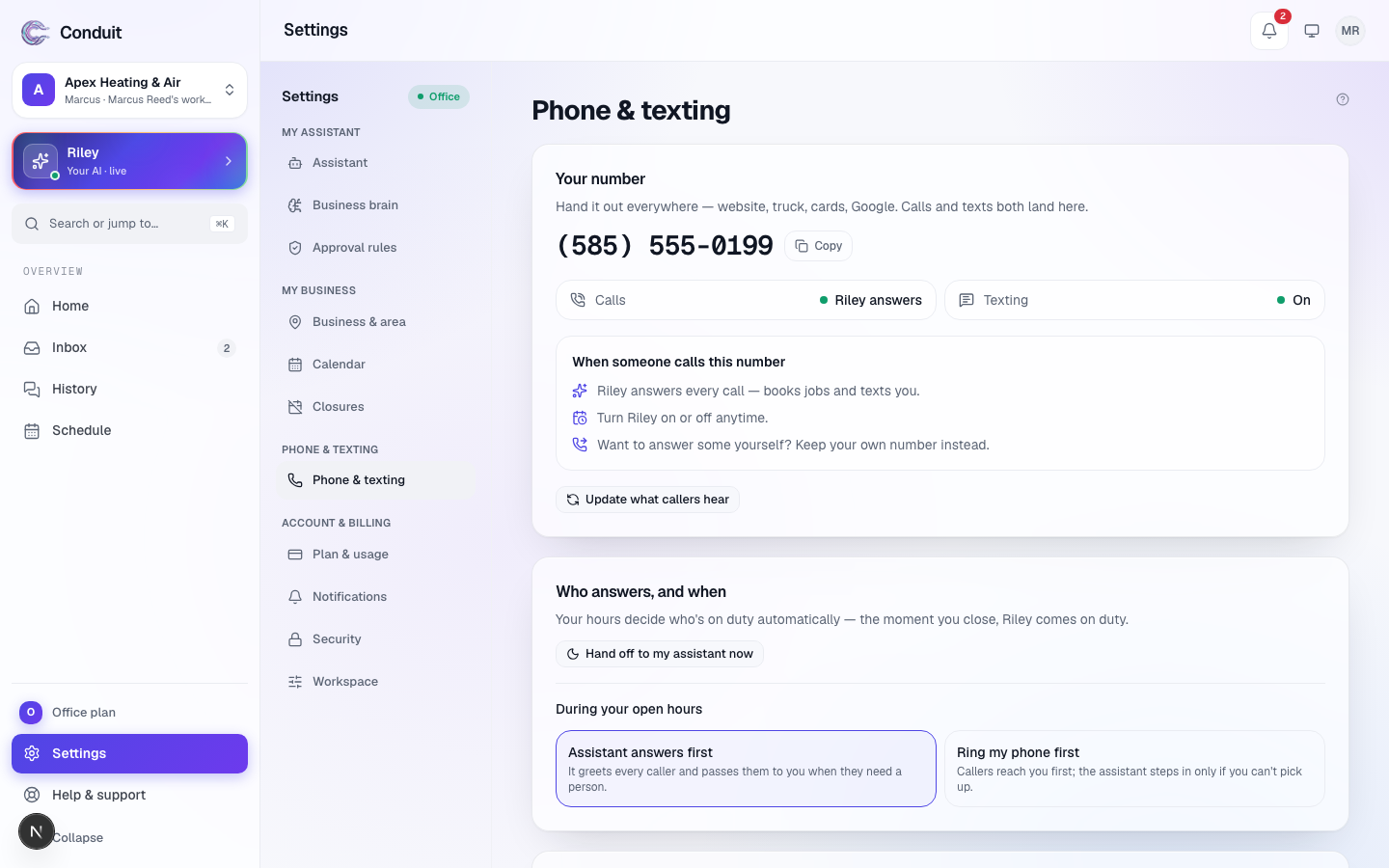
Your number sits on a dark card at the top, with a pill saying whether forwarding is on (and when it was linked or last checked).
- Your number ① is your assistant's real phone line, in big type. Tap Copy, at the card's top right, to put it on your website, your Google listing, your cards — calls land here, and texts do once registration clears.
- The tiles ② under it. Calls says who picks up — your assistant answers (it carries the name), or it rings you first, then your assistant — or that the line isn't live yet. Texting says On, In carrier review, Needs a quick fix, Off — your choice, or Not set up — see business texting approval. If you forward your own line, Business line, Carrier, and that carrier's Undo code (the one that turns all forwarding off) are there too.
Forwarding codes, under the card, opens every code for your carrier. Underneath, When someone calls this number spells out what happens in three numbered lines, and Update what callers hear republishes your greeting and settings to the live line.
Who answers, and when
Your hours decide who's on duty. If you forward every call (or hand out the assistant's number), you choose what happens during your open hours:
- Your assistant answers first (it carries the name) — it greets every caller and passes them to you only when someone needs a person.
- Ring me first — your phone rings first; your assistant steps in only if you can't pick up. This needs your verified cell.
If you forward only the calls you miss, your carrier already rings you first, and this choice doesn't apply.
When a caller asks to speak with you, pick one: Put them through (your assistant transfers them, and takes a full message if you can't pick up), Only when they ask for you by name, or Always take a message (real emergencies still reach you right away).
Leaving early? Hand calls to … now (it carries your assistant's name), at the right of this section's title, covers every call until you're back — see handing calls off for the rest of the day.
You never have to turn your assistant on at night. Your hours do it: the moment you close, it takes every call; the moment you open, it goes back to the choice above. Closures and vacation days work the same way — see closures and vacation.
Keeping your own number
Prefer the number you already advertise? Forward it to your assistant and customers keep dialing what they always have. The exact code for your carrier is under Send your calls to your assistant on Home (until a forwarded call comes through), and every carrier's codes are in forwarding your existing number.
Your numbers and emergency contacts
At the bottom, Your numbers & emergency contacts — with how many are verified and how many are still to verify — lists your cell and anyone you've added for emergencies (Show and Hide fold the list). Press Verify beside each one: a one-time code proves the number is really yours, and an unverified number is never rung or texted.
Common questions
Is the Conduit number the one I give to customers?
You can — it's a real local number that takes calls and, after registration, texts. Most owners instead keep the number they already advertise and forward it, so customers never see a change. Either works.
Can I answer some calls myself?
Yes. Forward only the calls you miss, so your phone rings first. Or forward everything and choose "Ring me first" on this screen — your assistant then steps in only when you can't pick up. You can switch any time.
What do open hours have to do with it?
Your hours decide who's on duty. The moment you close, your assistant takes every call; when you open, it follows the choice you set here. Nothing to flip at the end of the day.
Related
- Forwarding your existing numberKeep the number your customers know and forward it to your assistant — every call or only the ones you miss — with the exact carrier code to dial once.
- How many times your phone rings firstChoose how many times your own phone rings before an unanswered call rolls to your assistant, 2 to 3 recommended; Verizon is fixed at about 5 rings.
- iPhone owners: turn off Live VoicemailiPhone's Live Voicemail (iOS 17+) answers calls before forwarding can reach your assistant; turn it off in Settings so callers get a live answer.
Stuck? Write to a person.
Email support@conduitapp.ai — a real person reads every message. No ticket bots, no phone tree.